Remember when horizontal to vertical video converting meant endless cropping, nudging frames, and questioning your life choices? Yeah, same. The good news: those days are over. With horizontal-to-vertical conversion powered by AI Reframe, videos that once took hours to rework can now be transformed in seconds, automatically, and without manual fuss.
This guide explains how AI Reframe turns horizontal to vertical video in seconds, replacing manual cropping and timeline edits. By automatically detecting key subjects and adjusting framing for vertical platforms, creators and businesses can now repurpose existing videos faster, preserve visual quality, and publish more content across social channels with less effort.
Why you need horizontal-to-vertical conversion
Horizontal to vertical conversion is now essential because modern platforms are built for portrait viewing, not landscape playback. AI-powered reframing goes beyond basic cropping by preserving subject focus, motion, and composition, allowing creators to convert landscape video to portrait formats quickly, without manual tracking, guesswork, or endless keyframing.
Vertical video didn’t quietly sneak into the internet… it took over. TikTok rewired how people watch content, Instagram Reels doubled down on portrait-first design, and YouTube Shorts sealed the deal. These platforms don’t just support vertical video; they are optimized around it, from UI to algorithm behavior.
This shift changed how content is created and reused. Instead of filming separate videos for every platform, creators now rely on repurposing. A single podcast episode, webinar, or YouTube interview can fuel weeks of short-form content if it can be adapted properly. That’s where horizontal-to-vertical video conversion becomes a strategic advantage rather than a nice-to-have.
But here’s the problem: converting isn’t the same as cropping. Traditional cropping treats video like a static image, chopping off the sides and calling it a day. Video, however, is dynamic. People move. Cameras pan. Conversations shift.
When you simply crop, important visual cues disappear, faces drift off-screen, hands get cut mid-gesture, and the viewer loses context.
Anyone who has tried a horizontal-to-vertical conversion manually knows how quickly this becomes painful. Editors are forced to track subjects frame by frame, predict motion before it happens, and drop keyframe after keyframe just to keep someone visible. Multiply that by dozens of clips, and suddenly repurposing content feels slower than filming from scratch.
Even worse, manual editing introduces inconsistency. One clip might feel polished, while the next feels awkwardly framed. The viewer doesn’t know why it feels “off,” they just scroll past. In short-form feeds, where attention spans are measured in seconds, poor framing is a dealbreaker.
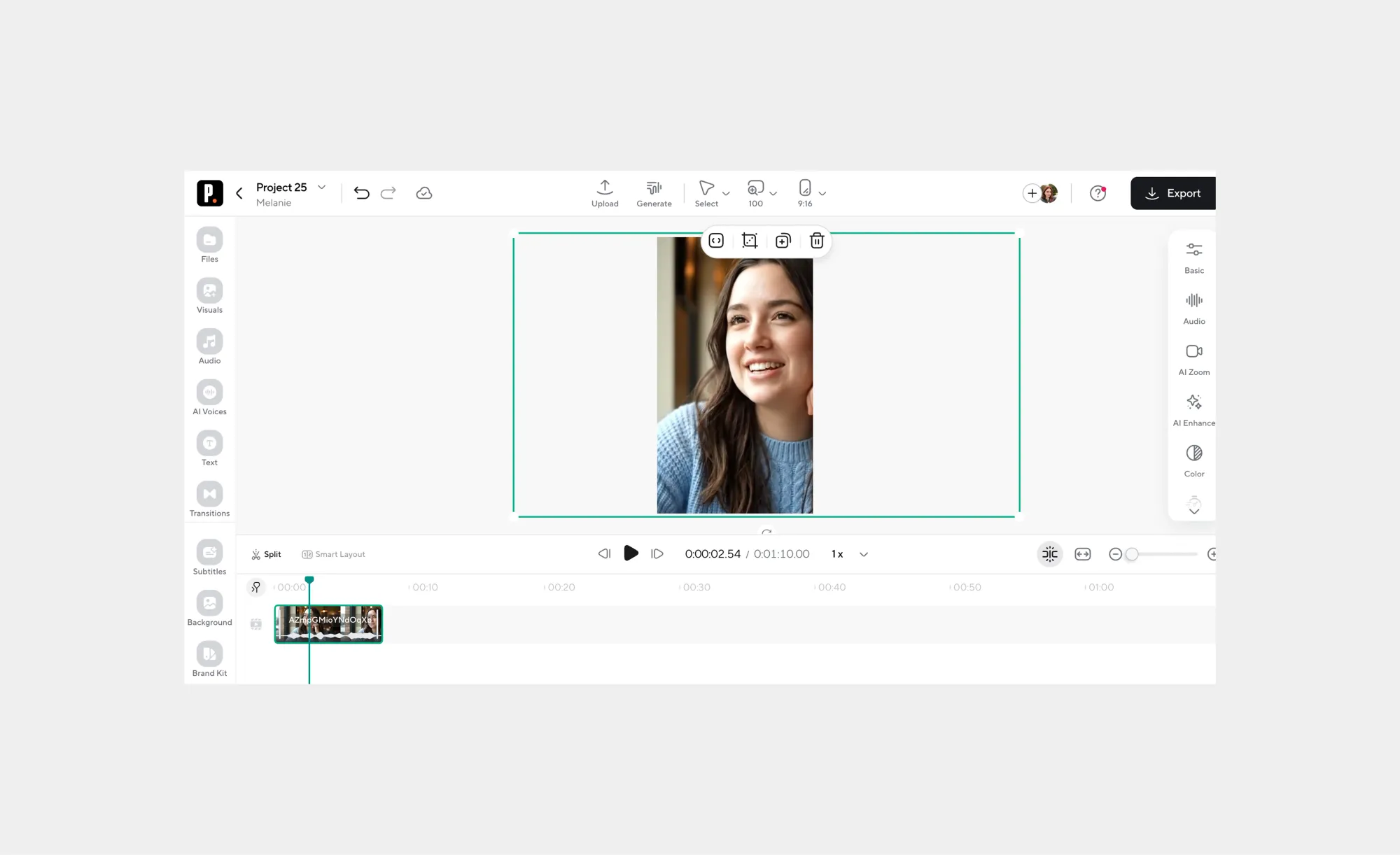
This is why simply trying to convert landscape video to portrait using basic tools often fails. Vertical video isn’t just narrower; it demands intentional composition. The subject needs to stay centered when it matters, transitions must feel natural, and motion should guide the viewer’s eye instead of fighting it.
Modern AI reframing solves this by treating video like video, not like a static rectangle. Instead of guessing, AI analyzes motion, speaker activity, and focal points in real time. The frame adjusts automatically, following the action and keeping the most important elements visible throughout the clip.
The result is vertical content that feels native, not repurposed. Long-form videos suddenly become a scalable content engine instead of an editing nightmare. Creators move faster, teams publish more consistently, and businesses finally get full value from the content they’ve already invested in.
What AI Reframe actually does (and why it works)
AI Reframe automatically tracks subjects in your videos, keeping them centered while converting horizontal to vertical formats. By eliminating manual keyframing and simple cropping, it ensures accurate framing and motion preservation. Creators can easily reframe videos with AI for interviews, tutorials, screen recordings, and talking-head content, saving hours of editing effort.
Manually reframing a video used to feel like performing brain surgery on your footage. You’d guess where a subject might move, add keyframes one by one, and hope the crop doesn’t ruin the composition. Enter AI Reframe, which turns all that painstaking work into seconds of automated magic.
At its core, auto-tracking is the game-changer. The AI analyzes every frame to detect your subject, whether it’s a person talking, a presenter gesturing, or a cursor moving across a screen, and keeps them centered in the frame.
This is why AI Reframe is far more accurate than simple cropping. Cropping treats the video as static content, chopping off edges and hoping the main subject stays visible. AI Reframe treats the video like a living scene: motion is tracked, subjects stay in focus, and context is preserved across the clip.
Check out some real-world scenarios where AI reframe can save your content, time, and energy:
• Interviews and talking-head videos: Faces remain fully visible even when participants shift or gesture.
• Tutorials and screen recordings: The AI keeps the relevant screen area or cursor in focus, making content easier to follow.
• Product demos and presentations: Viewers see the action exactly where it matters, without awkward framing or missing steps.
By using AI Reframe, creators and teams can finally reframe videos with AI efficiently, repurpose long-form content for vertical feeds, and focus on storytelling rather than tedious manual edits.
For a hands-on experience, check out Podcastle’s AI Reframe tool, which demonstrates how quickly horizontal-to-vertical conversion can become seamless and scalable.
Step-by-step: How to use AI Reframe to convert horizontal to vertical
Want to turn your wide horizontal videos into vertical, scroll-stopping content without hours of manual editing? With AI Reframe, it’s simple: upload your video, pick a 9:16 format, and let auto reframe do the work. It keeps your subject in focus and ready for Shorts, Reels, or TikTok in minutes.
Here’s exactly how to do it, step by step:
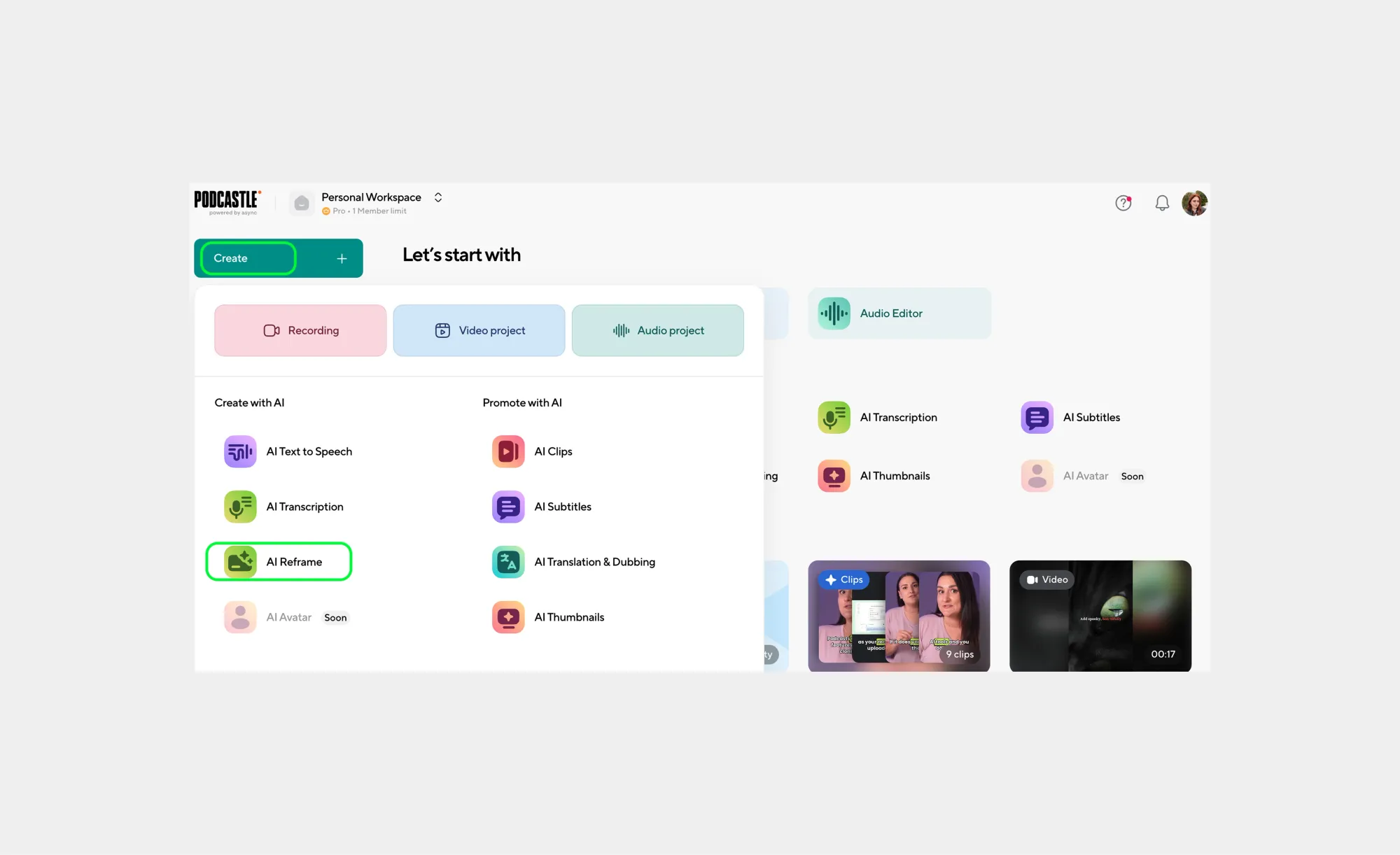
Step 1: Open AI Reframe in Podcastle
Log in to your Podcastle.ai account and click Create, then choose AI Reframe. This opens the dedicated workspace for converting horizontal to vertical video using AI, without manual cropping or keyframing.
Step 2: Add your video
Upload a video from your device, select one from your existing Podcastle projects, or paste a YouTube link. AI Reframe works directly with your original footage, so there’s no need to pre-edit or resize beforehand.

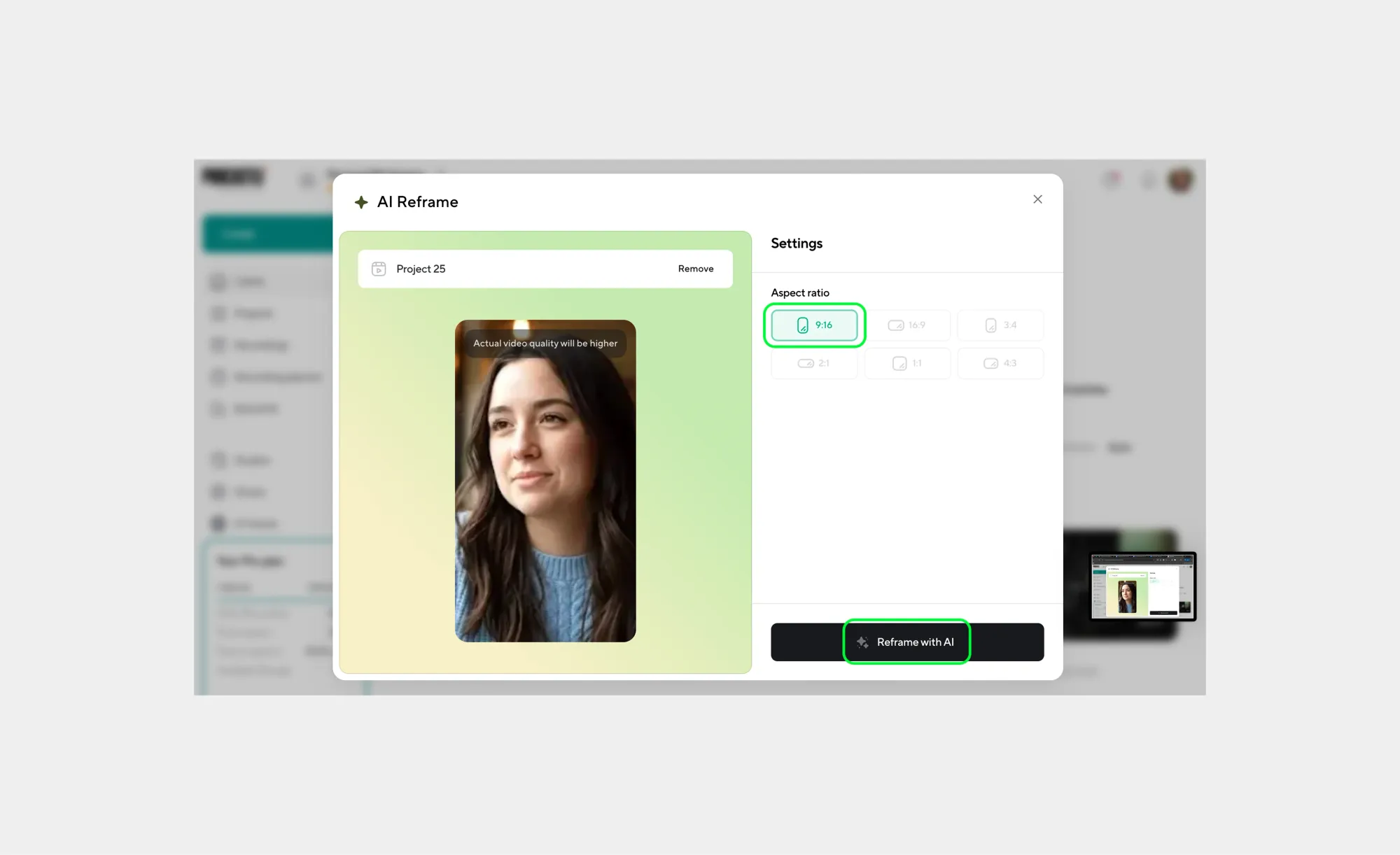
Step 3: Choose a vertical format and apply AI Reframe
Select the 9:16 vertical aspect ratio. This format is optimized for TikTok, Instagram Reels, and YouTube Shorts and sets the canvas for your auto reframe process.
Next, click Reframe with AI, and Podcastle will automatically analyze your video, detect the main subject or active speaker, and adjust the frame dynamically.
Step 4: Fine-tune tracking or framing (optional)
Once processing is complete, preview the vertical version. If needed, adjust tracking or reframing boundaries, especially useful for multi-person scenes, screen recordings, or demos. These tweaks are quick and precise, not full re-edits.
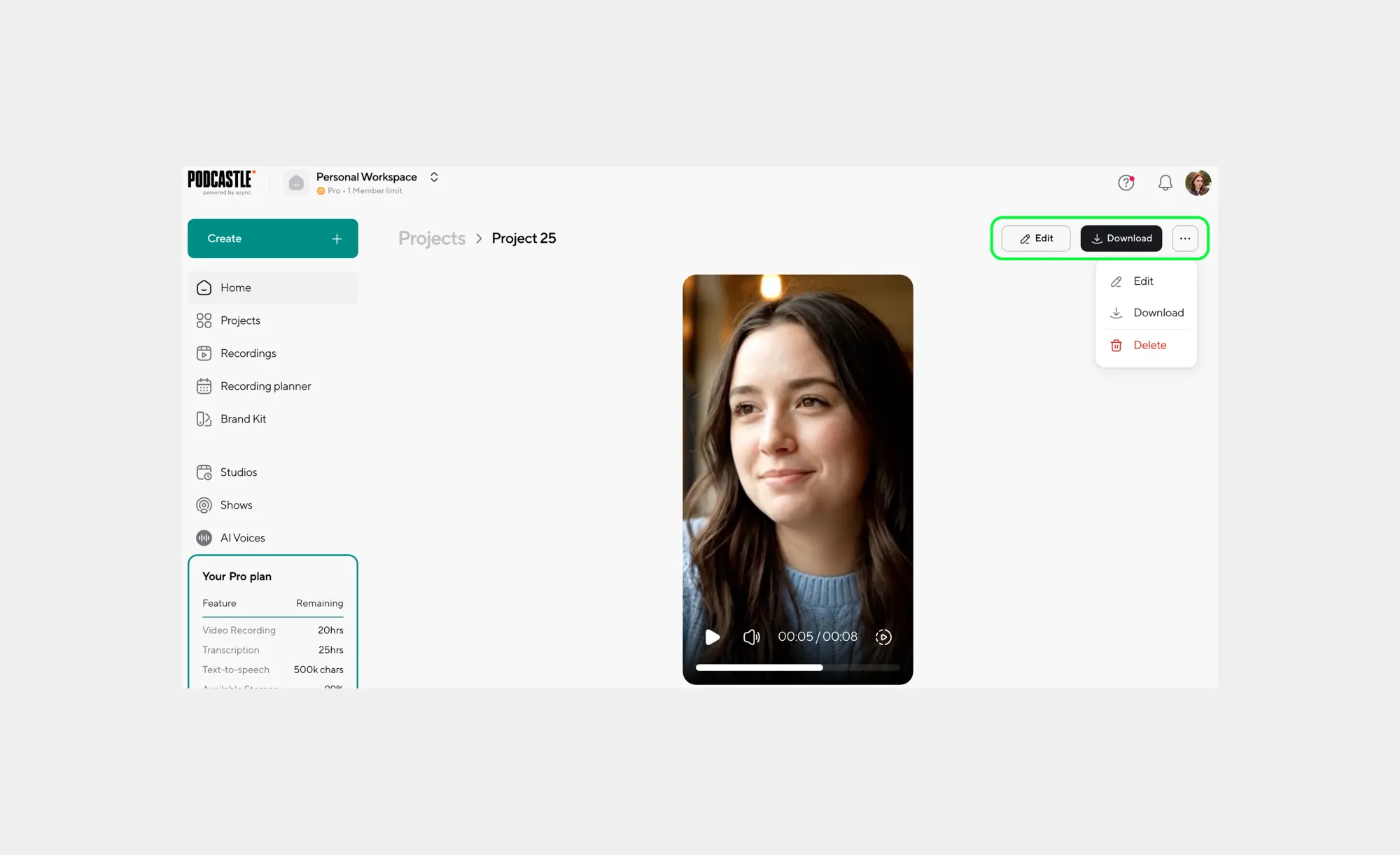
Step 5: Enhance your video (optional)
Use additional Podcastle AI features to improve overall quality. You can fix eye contact, clean up background noise, remove background, or enhance the quality of your video, all within the same workflow.
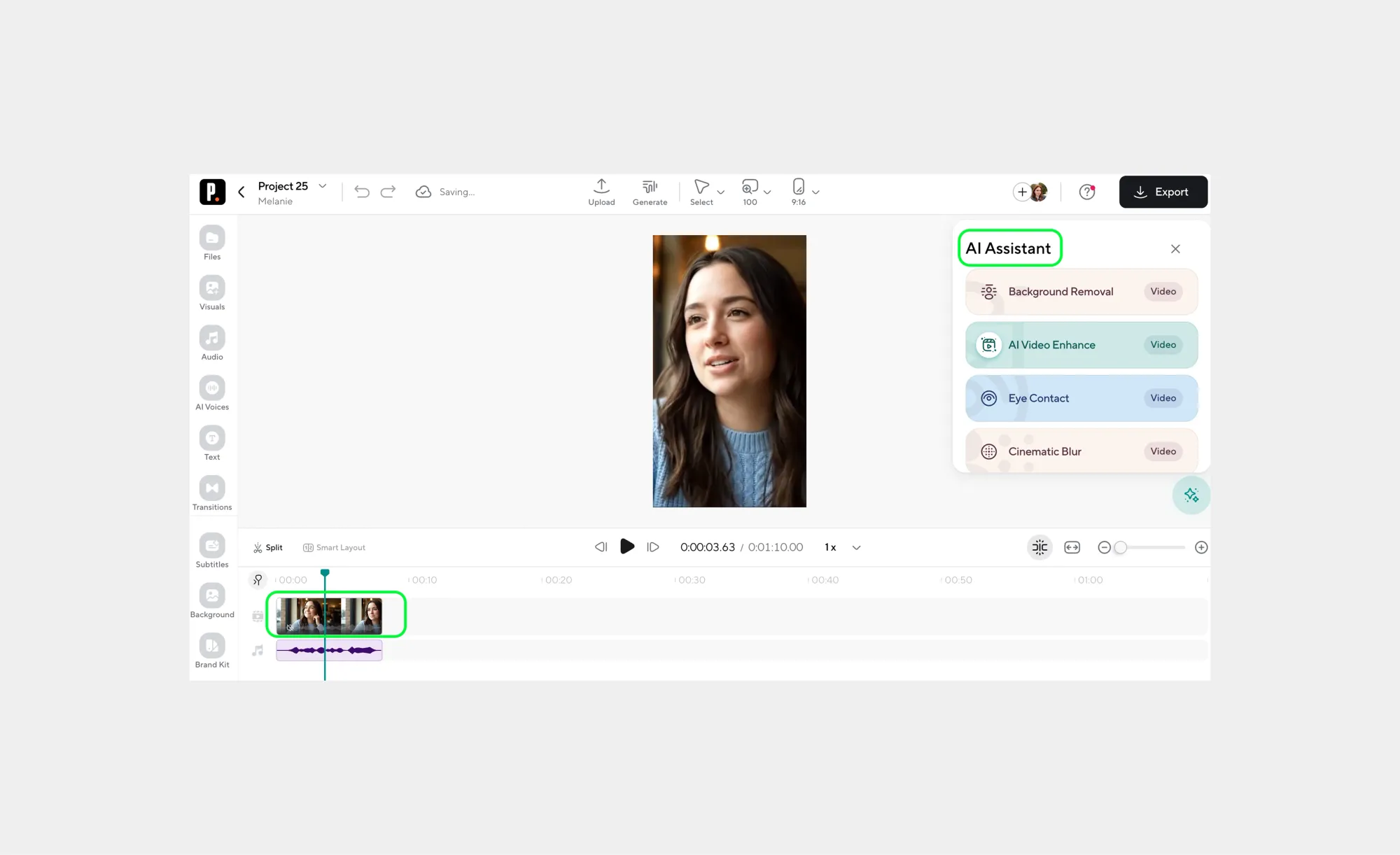
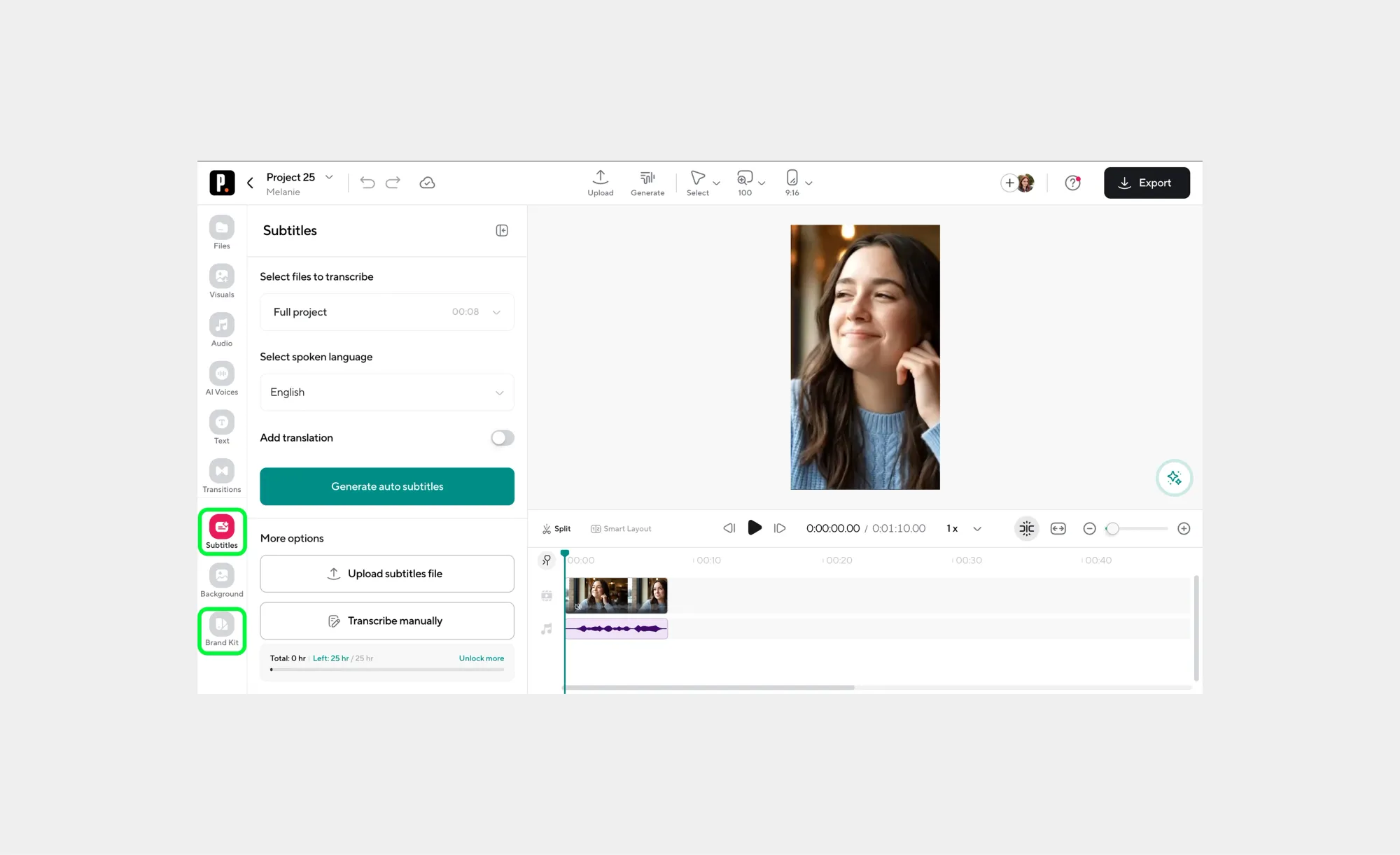
Step 6: Add captions or branding (optional)
For mobile-first platforms, captions boost engagement and accessibility. You can also apply brand elements to keep your content consistent across channels.
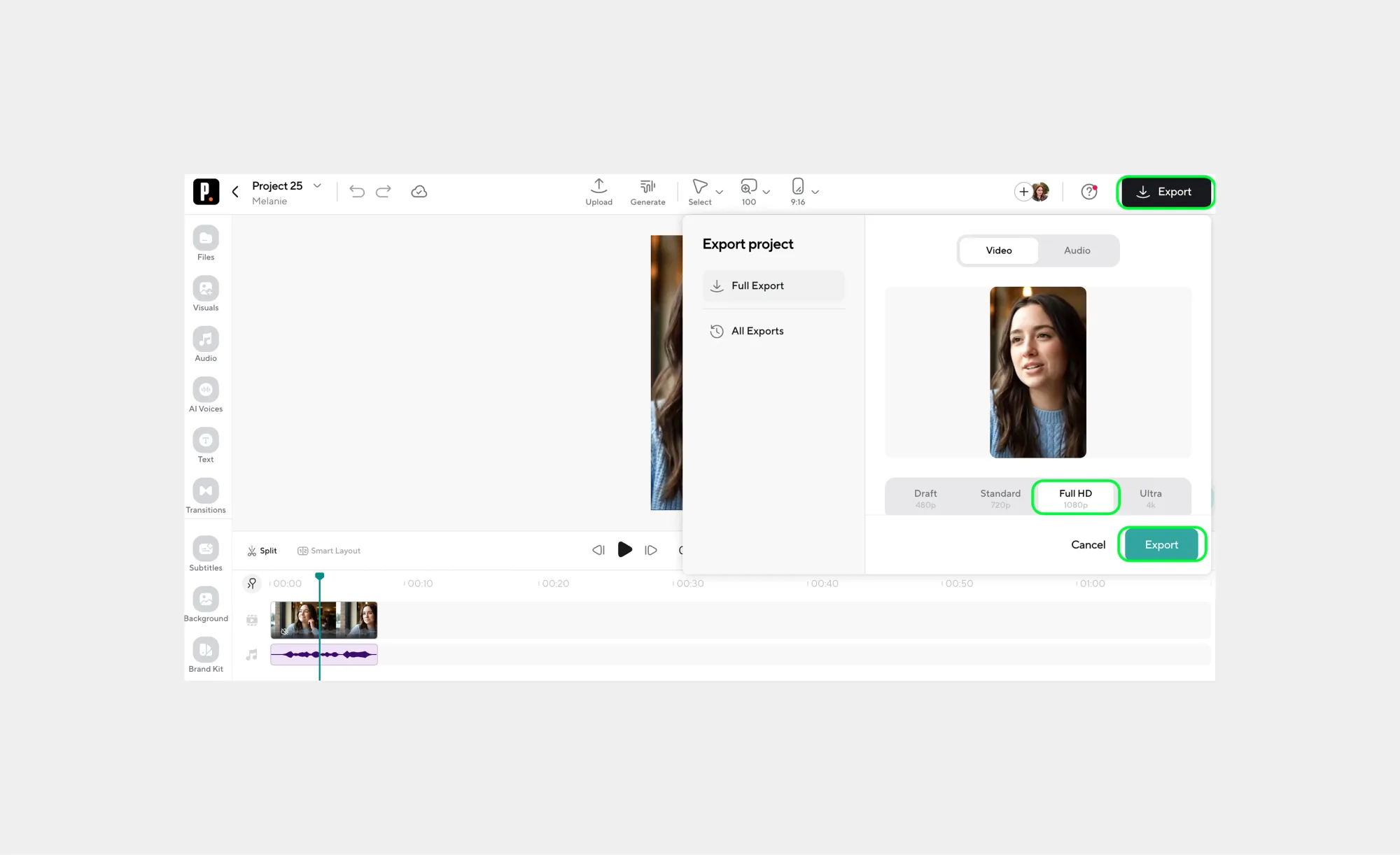
Step 7: Export for social platforms
Export your video in the resolution you need, and voilà! After a few seconds, you’ll get a ready-made video for YouTube Shorts, Reels, or TikTok.
How to resize a video for any platform without losing quality
Knowing how to resize a video is essential for creating content that looks professional across all social platforms. A video resizer adjusts your video’s dimensions to match platform-specific aspect ratios, while a horizontal-to-vertical video converter ensures your subject stays centered. Together, resizing and reframing preserve quality, focus, and motion in every clip.
Resizing a video isn’t just about fitting a square peg into a square hole, it’s about making sure your content looks intentional, polished, and platform-ready. Many creators think resizing is all they need. They take a horizontal video, shrink it into a vertical frame, and hope for the best. In reality, what they get is cropped heads, missing gestures, and awkward compositions that make viewers scroll past.
The key distinction is simple but often overlooked: resizing changes the dimensions of your video, while reframing decides what stays in the frame. Imagine filming a chef chopping vegetables in a landscape. If you only resize to vertical, part of the chopping action disappears. Reframing ensures the knife, ingredients, and chef remain visible throughout the clip. Without it, your vertical video feels incomplete or even sloppy.
Every platform has a “preferred video language,” or aspect ratio, to ensure your content looks native and professional. Every social platform is optimized for specific ratios to give viewers a full-screen experience. Ignoring these “video languages” can make even high-quality content look amateur. Here are the aspect ratios for each of the famous social media platforms:
• TikTok, Instagram Reels, YouTube Shorts: 9:16 vertical is king. These platforms are designed for immersive, full-screen mobile viewing. Vertical content fills the screen, keeps attention locked, and feels native to users scrolling on their phones.
• Instagram Feed: 1:1 square videos perform best here. Square videos look balanced in the feed, preventing awkward cropping and ensuring your visuals don’t get cut off.
• Facebook & LinkedIn: Both support 16:9 horizontal or 4:5 vertical. Horizontal videos work well for traditional content, while 4:5 vertical videos often improve mobile engagement without taking over the whole screen.
Using the wrong ratio can lead to letterboxing (black bars on top and bottom), pillarboxing (black bars on sides), or stretched/distorted visuals. These small missteps can make content feel unpolished, distract viewers, and reduce engagement, even if the video itself is excellent.
Think of aspect ratios like wardrobe sizing. A jacket that’s slightly too big or small might still cover you, but it won’t look sharp or fit the occasion. Matching your video to the platform’s ideal ratio ensures it feels intentional, professional, and tailored for maximum viewer impact.
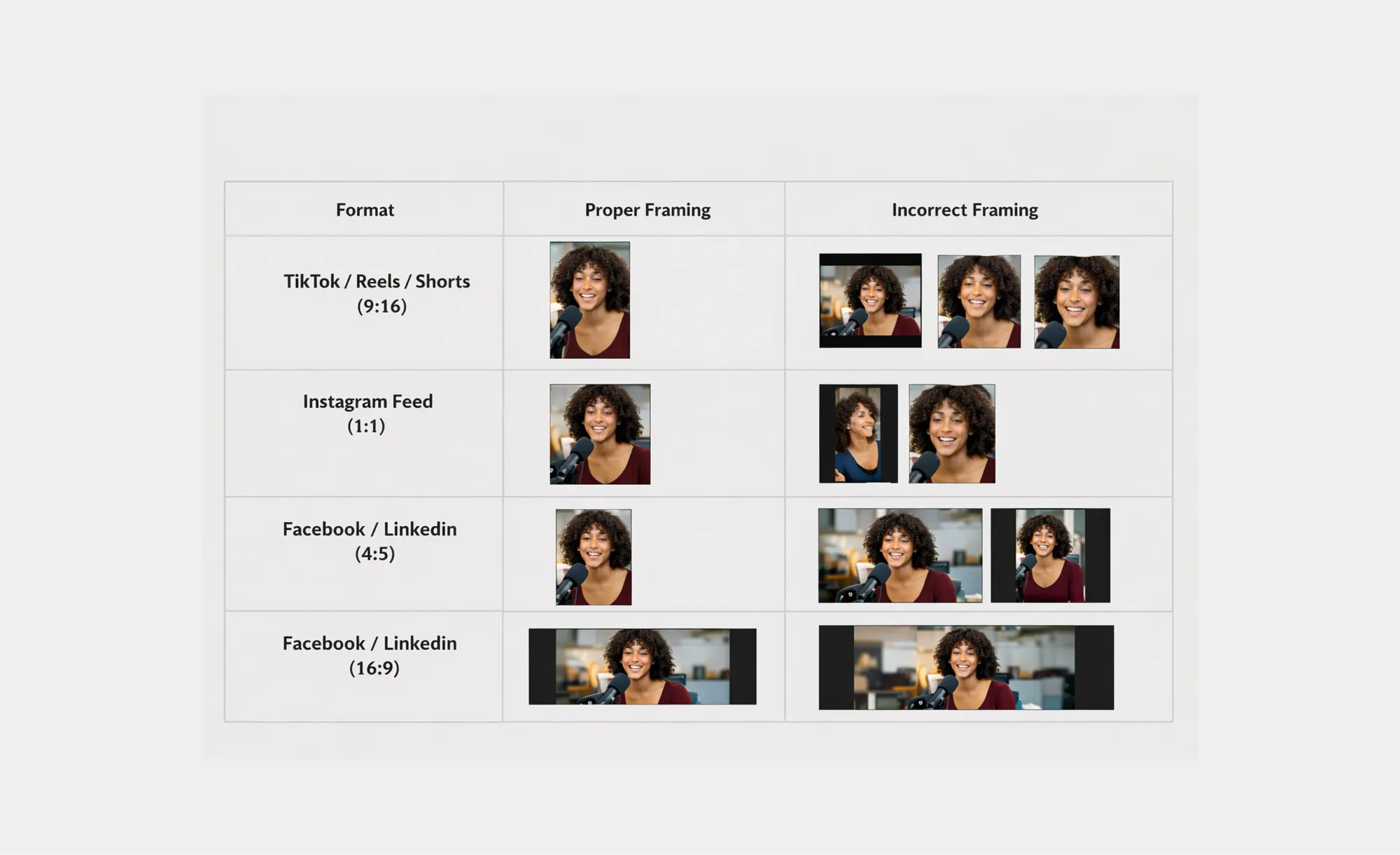
By understanding and applying the correct aspect ratio for each platform, creators can avoid framing issues, maximize screen real estate, and ensure their videos always look professional, no matter where they’re posted.
Some videos require both resizing and reframing to look natural. Consider an interview recorded horizontally: if you only resize, you may end up cutting off gestures, props, or even part of the speaker’s face.
Using an AI-powered horizontal to vertical video converter solves this problem by resizing and automatically tracking subjects, maintaining motion, focus, and composition in every frame. This combination ensures that the vertical version feels like it was shot natively for mobile viewing, rather than hacked together.
Here’s a step-by-step approach to resizing videos without losing quality:
1. Resize dimensions: Start with platform-specific resolutions, like 1080×1920 for vertical TikTok videos or 1080×1080 for Instagram feed. Using proper dimensions avoids unwanted stretching or squishing.
2. Reframe subject tracking: Use AI or manual methods to ensure your subject stays centered. For dynamic content like tutorials, screen recordings, or group interviews, this step is critical.
3. Export options: Always choose high-quality codecs like H.264 or H.265, set the right bitrate, and consider frame rate compatibility with the platform. This preserves sharpness and prevents pixelation.
4. Test before publishing: Watch the resized video on a mobile device to make sure no critical elements are cropped or misaligned.
Using AI-powered tools takes the guesswork out of the process. Instead of manually guessing keyframes or cropping every scene, the software automatically detects subjects, tracks motion, and applies the correct dimensions for the chosen platform. This workflow saves hours of editing, especially for creators repurposing long-form content into vertical clips.
10 practical ways to use AI Reframe for repurposing content
AI reframing isn’t just a technical feature; it’s a content multiplier. Below are practical, real-world ways creators and businesses actually use AI Reframe to get more value from the videos they already have, without reshooting or manual editing marathons.
1. Turning YouTube videos into TikToks
Long-form YouTube videos are goldmines for short-form content. With AI Reframe, horizontal clips can be converted into vertical TikToks while keeping the speaker centered and expressive. In Podcastle, this works especially well for talking-head videos and podcast recordings turned into snackable moments.
The best part is that you don’t even need to cut the clips yourself or even upload your video. Just choose the AI Clips feature, paste the link to your video, and get as many new TikTok and Instagram videos as possible.
2. Repurposing webinars into short vertical clips
Webinars often sit unused after they’re over. AI Reframe allows you to extract key insights, resize them for vertical formats, and automatically keep the presenter in frame. Podcastle users can quickly turn one webinar into multiple Reels or Shorts without re-editing the original recording.
3. Auto-reframing interviews for social platforms
Interviews rarely stay static, because people lean, gesture, and shift positions. AI Reframe tracks the active speaker and adjusts the frame dynamically. Inside Podcastle, interviews recorded in landscape can be reframed into clean vertical clips that feel native on mobile feeds.
4. Focusing on a speaker in a multi-person scene
Group discussions and panel recordings are notoriously hard to crop manually. AI Reframe detects who’s speaking and keeps them visible. This makes it possible to convert wide, multi-person footage into vertical clips without losing context or cutting people out mid-sentence.
5. Transforming tutorials into vertical explainers
Tutorials and how-to videos often include movement, demonstrations, or screen interaction. AI Reframe ensures the important action stays in view when converting to portrait.
6. Turning product demos into Instagram Reels
Product demos don’t need to live only on landing pages. AI Reframe makes it easy to convert landscape demos into vertical Reels that highlight key features.
7. Creating social ads in multiple formats
Paid ads often need multiple versions for different platforms. AI Reframe lets marketers generate vertical, square, and horizontal cuts from a single source video. This reduces production time and keeps messaging visually consistent across campaigns.
8. Reframing behind-the-scenes footage
Behind-the-scenes clips are often shot casually and horizontally. AI Reframe cleans them up for vertical platforms by centering faces and action, making informal footage feel intentional and shareable.
9. Turning event recordings into vertical highlights
Conference talks, meetups, and live events are usually recorded wide. AI Reframe allows teams to extract vertical highlights that focus on the speaker or key moment, perfect for post-event social content.
10. Reframing screen recordings for mobile viewing
Screen recordings can feel cramped or unreadable on phones. AI Reframe intelligently focuses on relevant screen areas, making tutorials and demos easier to watch vertically. This is especially useful when repurposing desktop-first content for mobile audiences.
The real power of AI Reframe isn’t just saving time; it’s unlocking scale. Instead of asking, “Should we re-edit this for vertical?”, creators can confidently say yes, knowing they can convert landscape video to portrait formats quickly, accurately, and consistently.
With tools like Podcastle AI Reframe, repurposing becomes part of the workflow, not an afterthought.
Going vertical… where to start
If repurposing content feels overwhelming, it’s usually because there’s no system. Once you follow a clear, repeatable checklist, the process becomes mechanical, in a good way. Below is a practical, end-to-end workflow you can reuse for every video you’ve ever recorded.
1. Upload your original video
Start with the source material: podcasts, interviews, webinars, demos, tutorials, or event recordings. Horizontal videos work perfectly here; you don’t need to prep them in advance. The goal is to work with what you already have.
2. Resize for your target platform
Choose the correct aspect ratio before doing anything else. Vertical (9:16) for TikTok, Reels, and Shorts. Square (1:1) for Instagram feed. This sets the “container” your content will live in and avoids awkward exports later.
3. Apply AI Reframe
This is the core step. Use AI reframe to automatically adapt the video to the new format. Instead of guessing crops, the AI tracks motion, speakers, and focal points, making it easy to reframe videos with AI accurately and consistently.
4. Adjust focus if needed
AI gets you 90% there, fast. For certain clips, like multi-person conversations or demos, you may want to fine-tune focus or framing. This step is quick and optional, not a full re-edit.
5. Export platform-ready versions
Export your video using platform-optimized settings. This ensures correct resolution, frame rate, and quality, so you’re not dealing with compression issues or blurry uploads later.
6. Add captions
Most vertical videos are watched without sound. Adding captions isn’t optional; it’s a performance booster. Clear, readable captions improve accessibility and increase watch time across all platforms.
7. Save presets for future videos
Once you find export settings, caption styles, or framing preferences that work, save them. Presets turn repurposing into a one-click process instead of a repeat task.
8. Batch your reframing
This is where scale kicks in. Don’t reframe one video at a time. Upload multiple clips and apply the same workflow in batches. AI-powered reframing makes bulk repurposing realistic instead of exhausting.
9. Schedule your content
Repurposing isn’t finished until content is published. Queue your vertical clips across platforms to maintain consistency without daily manual posting.
10. Review on mobile before publishing
Always do a final check on your phone. Make sure subjects are centered, captions are readable, and nothing important is cut off. If it looks good on mobile, it’ll perform well where it matters.
This checklist turns repurposing into a fast, simple, repurpose-everything workflow. Instead of letting old videos collect dust, you can systematically convert, reframe, and publish your entire library, without reshooting, without burnout, and without losing quality.
Ready to turn your existing content into engaging vertical videos that grab attention on every platform? Try Podcastle AI Reframe today and see how easy it is to repurpose, resize, and reframe your videos automatically, saving time, boosting engagement, and transforming the way you create for social media.
FAQs
What is AI reframe?
AI reframe is an automated video editing process that intelligently adjusts framing when changing aspect ratios. Instead of static cropping, it detects speakers, motion, and focal points to keep important content visible. This makes it easier to repurpose horizontal videos into vertical formats without manual keyframing or constant adjustments.
How do I convert a horizontal video to vertical?
To convert a horizontal video to vertical, you first resize it to a portrait aspect ratio like 9:16, then apply reframing so the subject stays centered. AI-powered tools handle this automatically by tracking movement and focus, allowing you to repurpose content quickly without re-editing the entire video from scratch.
What is the best horizontal-to-vertical video converter?
The best horizontal-to-vertical video converter combines resizing with AI-powered reframing. Instead of basic cropping, it automatically tracks speakers and key action to preserve composition. This approach produces vertical videos that look native to platforms like TikTok, Reels, and Shorts while saving significant editing time.
How do I resize a video without losing quality?
To resize a video without losing quality, use platform-recommended resolutions and export settings, such as proper aspect ratios, frame rates, and bitrates. Pair resizing with reframing to avoid cutting off important visuals. High-quality codecs and previewing on mobile devices also help maintain sharpness and clarity.
How does automatic reframing work?
Automatic reframing works by analyzing each frame of a video to detect motion, faces, and active speakers. The system dynamically adjusts the crop to follow what matters most on screen. This removes the need for manual tracking and keyframes while ensuring smooth, accurate framing across the entire clip.