If you’ve ever finished recording a podcast episode and thought, “Okay… now I have to turn this into clips,” you’re not alone. Creating short, engaging podcast clips used to mean scrubbing through long recordings, guessing which moments might perform well, and spending hours in an editor just to get a few usable snippets.
This is exactly where AI steps in, and why so many creators are rethinking how they approach podcast editing.
Learning how to use AI to make podcast clips changes the process completely. Instead of manually searching for highlights, AI-powered tools can analyze your audio, spot key moments, and help you generate ready-to-share clips in a fraction of the time. What once felt like a tedious post-production task becomes a fast, creative step in your content workflow.
Whether you’re a podcaster trying to grow your audience, a creator repurposing long-form content, or a marketer looking for consistent social clips, an AI podcast clip generator can simplify editing, save hours of work, and help you focus on what actually matters: the story you’re telling.
So how does AI actually do this, and what does the process look like in practice? Let’s break it down.
What are AI clips, and how do they work for podcasts?
Think of AI clips as your highlight reel assistant. Instead of you scrubbing through a 60-90 minute episode hunting for “that one great moment,” an AI podcast clip generator can analyze the audio (and often the transcript) and suggest the best segments to turn into short, shareable clips.
Here’s the important part: most modern AI clip tools don’t “listen” the way humans do first, they convert your audio into structured data, then use that to find moments worth clipping.
The (real) workflow behind an AI clip maker
1. Speech-to-text (transcription): The tool transcribes your episode so it can “read” what was said. Some widely used ASR systems are trained on massive datasets, for example, OpenAI’s Whisper was trained on 680,000 hours of multilingual audio.
2. Speaker awareness (diarization): In multi-speaker podcasts, good tools label who spoke when (speaker diarization), so the clip doesn’t cut mid-thought or mix voices awkwardly.
3. Moment scoring: This is where it gets interesting. The AI ranks moments based on signals that often correlate with “clip-worthy” segments.
4. Clip assembly + packaging: The selected moments get trimmed, leveled, sometimes cleaned, and prepared for publishing (often with captions if video is involved).
What AI looks for (it’s not just “keywords”)
A strong Podcast editor powered by AI typically scores moments using a mix of transcript + audio patterns, such as:
• Tight “question to answer” sequences
• Speaker turn-taking spikes: Back-and-forth debate tends to be more engaging than monologues.
• Story structure markers: Use phrasings like “here’s what happened…”, “the lesson was…”, “the mistake was…”
• Emphasis + emotion cues in the voice: Focus on louder energy, laughter, surprise, and strong contrast.
• Topic shifts: Clean chapter boundaries make cleaner clips.
• Silence and filler patterns: Helpful for cutting dead air without choppy pacing.
This is why transcripts matter so much: once your episode becomes text + timestamps + speaker turns, the AI can search for patterns fast.
Even podcast platforms talk about the transcript as the “foundation” for higher-quality AI outputs.
Why this matters now
Podcasting is crowded; estimates put the ecosystem around 3.2 million podcasts (with counts varying depending on inactive shows). Clips help you compete for attention without publishing longer episodes.
And on the production side, automation genuinely saves time: one industry roundup cites that 62% of professionals using automated transcription save 4+ hours per week.
A quick note (so you don’t get burned)
AI is fast, but not flawless. Speech-to-text systems can sometimes produce errors or even “hallucinate” text in certain conditions, which is why a quick human review before posting is still smart, especially for names, numbers, and spicy quotes.
How to use an AI clip maker for podcasting
Alright, here’s the part you actually care about: the repeatable workflow. The goal isn’t just to “make a clip.” It’s to turn one episode into several clips you can post confidently, without spending your whole day inside a timeline.
Step 1: Upload your podcast episode
Start by uploading your video into the AI clip maker, or just paste a YouTube link to get started.
Pro tip: If you have both, upload the highest-quality file you’ve got (WAV or high-bitrate MP3). Cleaner audio = better transcription = better clip suggestions.

Step 2: Let the AI generate a transcript
Once the file is uploaded, the tool will automatically transcribe your episode. This matters because the transcript becomes the “map” the AI uses to find moments that are worth clipping.
While the transcript is generating, you don’t need to do anything, this is where AI starts saving you time.
Step 3: Generate AI Clips suggestions
Now you trigger the clip creation step: the tool scans your episode and suggests multiple potential highlights.
What you’ll usually see:
• A list of suggested moments, each with a start/end time
• Short preview titles or descriptions, so you know what each clip is about
• The ability to play each moment instantly before exporting
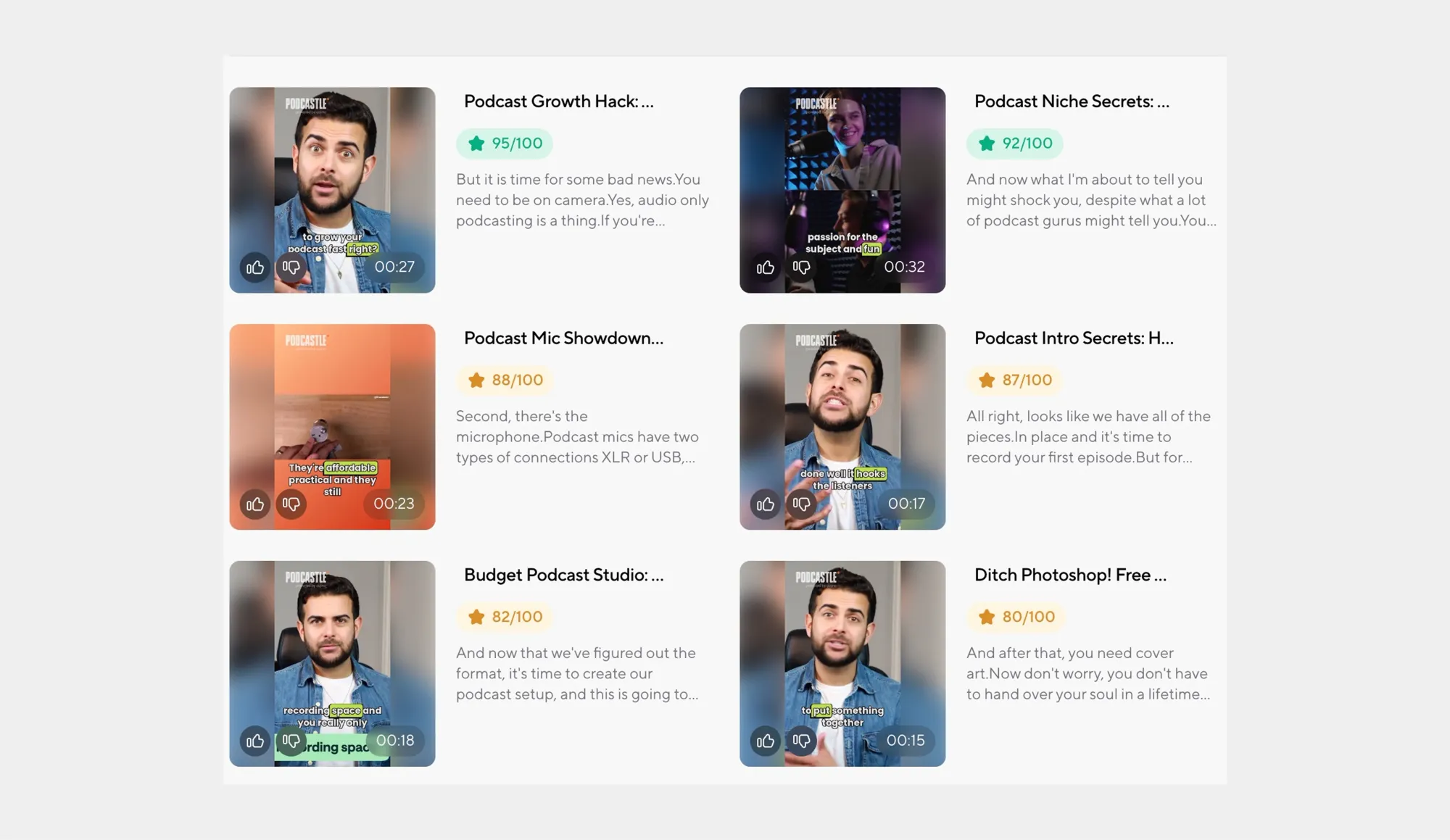
This is where an AI podcast clip generator is different from manual editing: you’re reviewing options, not hunting for moments from scratch.
Step 4: Choose the best moments
Pick clips based on purpose, not just ranking.
A simple way to choose:
• 1 “hook” clip: a bold statement, hot take, or surprising insight
• 1 “value” clip: a practical tip, framework, or step-by-step moment
• 1 “human” clip: a funny moment, story, or relatable confession
That mix keeps your content from feeling repetitive when you post multiple clips from the same episode.
Step 5: Trim and polish in seconds
Once you select a clip, do a quick cleanup pass:
• Tighten the first 1-2 seconds (remove “so yeah…” / throat clears)
• Cut any dead air at the end
• Apply light audio enhancement so the clip sounds consistent and “finished”
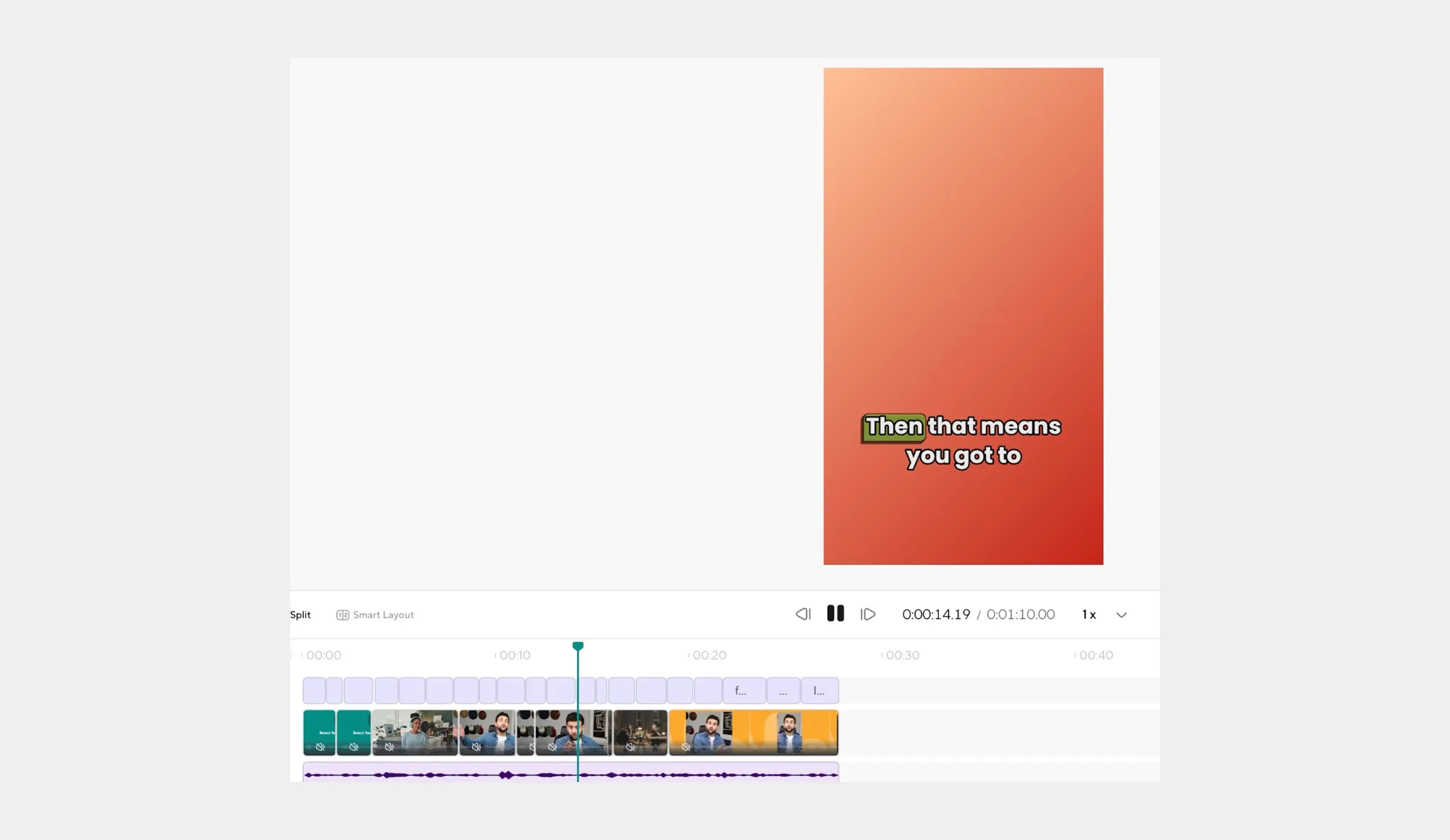
You’re not doing heavy editing here, just making the clip feel intentional.
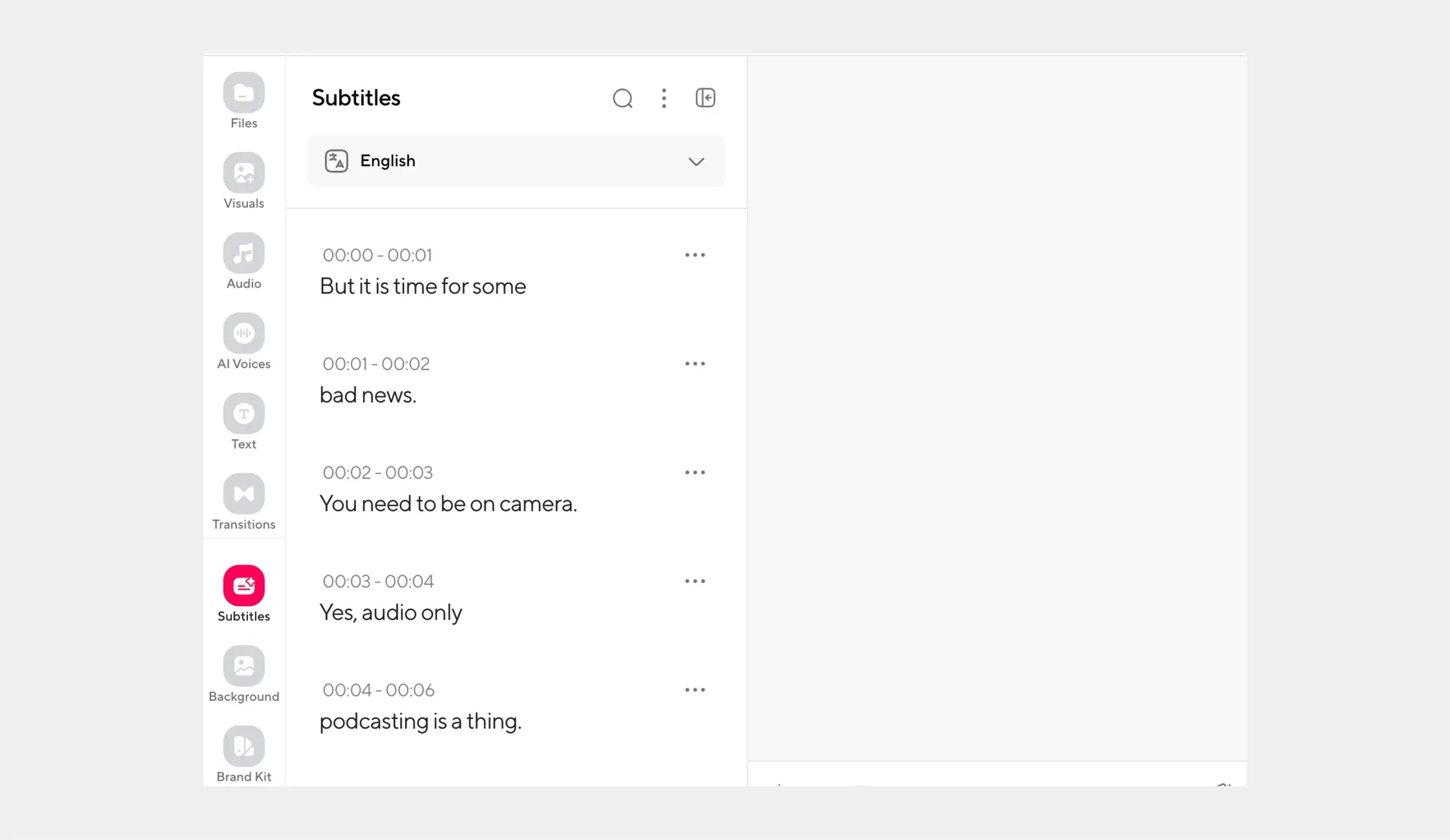
Step 6: Add captions
If your clip is for Instagram, TikTok, YouTube Shorts, or LinkedIn, captions are a big deal. Most people scroll with sound off.
Add captions and quickly check:
• Names (guests, brands, cities)
• Numbers (“15” vs “50” mistakes happen a lot)
• Any technical terms
Step 7: Export in the right format for where you’ll post
Export with the platform in mind:
• TikTok / Reels / Shorts: short and punchy, often 15-45s
• Instagram feed / LinkedIn: slightly longer can work (30-60s) if it’s tight
• YouTube: Longer clips can perform well if they tell a complete mini-story
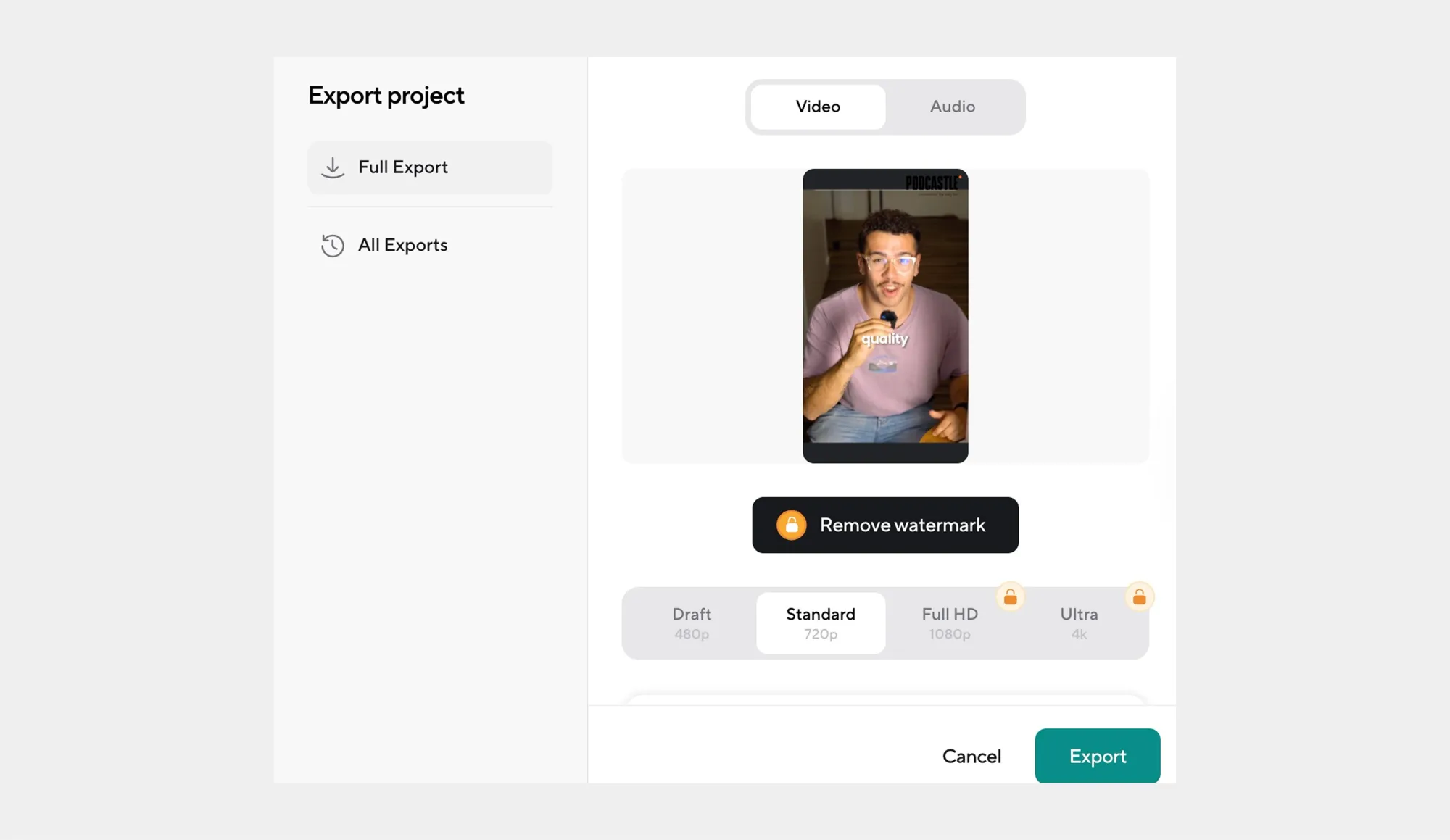
Pick the right aspect ratio while exporting, so you’re not resizing later.
Step 8: Repeat the workflow (this is the “content engine” part)
Once you’ve done it once, the process becomes simple:
1 episode → 3–8 clips → scheduled across the week.
That’s how an AI clip maker helps you build consistency without recording more.
How AI helps podcast creators save time with editing
Most people underestimate how time-heavy podcast editing is until they do it a few times. A pretty common benchmark is 3-5 hours of editing for a 60-minute episode and it can be more for highly produced shows.
The time savings come from where AI cuts the workflow
AI doesn’t just “speed things up” in a vague way, it saves time because it removes the slowest parts of editing: searching, re-listening, and doing the same cleanup actions over and over.
• You stop “listening to find the edit”: A big hidden time drain is scrubbing waveforms and replaying sections to locate a moment, confirm it, then trim it. With text-based editing, you can edit the transcript like a document instead of hunting through the timeline, which is exactly why Adobe calls out text-based editing as a time-saver compared to “endless waveforms.”
• It reduces “micro-edits”: Filler words, awkward pauses, and tiny stumbles are easy to notice, but annoying to fix one by one. AI can detect and remove them more safely by analyzing the audio around the edit. Descript even notes an “avoid harsh cuts” approach that checks surrounding audio to prevent choppy-sounding removals.
• It standardizes audio quality early in the process: This one is less obvious, but huge in real life: once AI handles baseline cleanup, you spend less time doing second passes because the episode “holds together” sonically from the start. Tools like Adobe’s Enhance Speech are explicitly built to remove background noise/echo and make the voice sound more studio-like with minimal manual work.
The “quiet” editing tasks AI speeds up
Beyond the obvious cuts, AI quietly accelerates dozens of small tasks that normally slow editors down:
• Rough-cutting by meaning, not waveforms: cut whole answers, tangents, or repeats by deleting text lines.
• Batch cleanup: apply the same enhancement/noise reduction approach across segments so you don’t tweak settings clip-by-clip.
• Clip-ready moments without manual hunting: AI can surface highlights based on transcript + pacing patterns, so you start from “best candidates” instead of starting from minute 00:00.
A simple “math” reality check
If 3-5 hours per one hour episode is a normal editing range, even saving one pass or avoiding re-listening to find moments is a meaningful weekly win, especially because a lot of podcasts are 30+ minutes long.
Bottom line: an AI podcast clip generator saves time, but the real advantage is workflow compression: fewer listen-throughs, fewer repetitive micro-edits, and fewer “oops, I need to redo that section” moments.
How to create professional podcast clips with our AI Clips tool
Making a clip is easy. Making one that feels professional is where most creators struggle.
Professional podcast clips have a few things in common: they sound consistent, get to the point quickly, and don’t feel rough or unfinished. Our AI Clips tool is designed to handle those details automatically, so your clips feel intentional, even when they’re created fast.
What makes a podcast clip feel “professional”
Before talking tools, it helps to define what quality actually means in short-form podcast content:
• Clean, even audio that doesn’t jump in volume
• Clear context within the first few seconds
• Tight pacing with no awkward pauses
• Readable captions that match what’s being said
AI Clips focuses on these fundamentals rather than flashy effects.
How AI Clips improves clip quality
Instead of asking you to manually polish every clip, AI Clips applies professional editing logic automatically.
• Audio consistency by default: AI audio enhancement helps normalize volume, reduce background noise, and keep voices clear across clips, so each clip sounds like it came from the same studio session, even if it didn’t.
• Context-aware clip boundaries: AI Clips avoids cutting mid-thought by using transcript context and speaker turns, which makes clips feel complete rather than abrupt.
• Captions that match the pacing of speech: Automatically generated captions are timed to natural speech rhythm, making them easier to read and more engaging on social platforms.
• Editing that prioritizes the opening seconds: Professional clips hook the listener quickly. AI Clips emphasizes strong openings, helping your clips get to the point without long lead-ins.
Turning raw moments into share-ready content
What normally takes multiple manual steps, trimming, leveling, captioning, and formatting, happens in one place. That’s the difference between “I made a clip” and “I made something I’m comfortable posting.”
With AI Clips, your focus shifts from fixing clips to choosing the best moments and deciding how to use them.
When this matters most
This level of polish is especially useful if you:
• Post multiple clips from one episode
• Share content across different platforms
• Want your podcast to feel consistent even as it scales
You don’t need to become an audio engineer to publish professional clips, the tool handles the technical quality, so you can focus on the message.
How AI clips can help you market your podcast
Marketing your podcast isn’t just posting more. It’s getting more people to sample you, faster, and AI clips are basically your best sampling strategy because they turn one long episode into dozens of entry points across platforms.
1. AI clips match how social algorithms actually distribute content
Most social feeds reward content that holds attention, not content that’s important. Platforms like TikTok heavily optimize for watch time and engagement, which is why tight, well-paced clips consistently outperform messy excerpts.
2. Clips help discovery inside podcast platforms, too
This is the non-obvious part: clips aren’t only a social tactic anymore, they’re becoming a podcast discovery mechanic. Spotify’s creator resources specifically highlight how shows use short-form clips on Spotify to drive podcast discovery and growth.
3. Captions aren’t optional
A lot of clip performance comes down to whether your message lands with the sound off. Sprout Social cites that 74% of Facebook videos are watched without sound, which means captions and on-screen text can be the difference between a scroll and a follow.
And creators are leaning into this: Wistia reports caption usage has increased 572% since 2021.
The marketing advantages you get specifically from AI-generated clips
Here’s what AI gives you that’s hard to replicate manually, and why it matters for growth:
• More “hooks” per episode: AI can surface multiple strong openings, so you can test different angles, hot take vs. story vs. quick tip, without re-editing everything.
• Faster posting cadence without burnout: Consistency is a marketing strategy, but manually editing clips makes consistency expensive. AI lowers the cost.
• A/B testing becomes realistic: You can post 3 versions of the same moment, different lengths/captions/first line, and see what your audience actually reacts to.
• Better content distribution across platforms: Short clips aren’t one-size-fits-all, AI makes it easier to tailor for Shorts/Reels/TikTok quickly, instead of resizing and rewriting every time.
A quick “do this, not that” checklist for using AI clips as marketing
If you want clips to grow your podcast, not just fill your feed, use this simple playbook:
• Do: Lead with the most interesting line in the first 1-2 seconds
• Do: Add captions every time, many viewers watch muted
• Do: Make multiple clips per episode and test different angles
• Don’t: Post only “random highlights” with no context, they get skipped fast.
• Don’t: Use one clip format everywhere; each platform rewards different pacing and structure.
How to extract key moments from your podcast using AI
Finding the right moments to clip is usually the most frustrating part of podcast editing, not because the moments aren’t there, but because they’re buried inside long conversations. AI changes this by shifting the work from manual searching to smart review.
Instead of listening back from start to finish, AI tools analyze your episode and surface moments that are more likely to stand on their own as short-form content.
How AI decides what’s worth clipping
AI doesn’t randomly pull snippets. It looks for structural and conversational signals that often translate well into clips, such as:
• Clear question-and-answer exchanges that feel complete without extra context
• Strong opinions or decisive statements that create a natural hook
• Story beats (setup → moment → takeaway) that work even when shortened
• Energy shifts in speech, like emphasis, excitement, or laughter
• Clean topic transitions, which make for smoother clip boundaries
These signals help the AI suggest moments that feel intentional rather than chopped out of the middle of a conversation.
What you should still review and why it matters
AI gets you 80-90% of the way there, but a quick human pass makes a big difference.
When reviewing suggested clips, check:
• The opening line: Does it pull someone in immediately, or does it need trimming?
• Context: Can a new listener understand this without hearing the full episode?
• Length: Is it tight enough to hold attention on social platforms?
• Tone: Does the clip represent your show the way you want it to?
This step usually takes minutes, not hours, and dramatically improves clip performance.
Turning one episode into multiple usable moments
One of the biggest advantages of using AI is volume without chaos. From a single episode, you can often extract:
• One strong hook clip
• One educational or value-driven moment
• One relatable or human moment
That gives you variety across posts while staying consistent with your message.
A simple rule of thumb
If a moment makes sense without explanation, it’s probably a good clip. AI helps you find those moments faster, and your judgment helps you choose the best ones.
Benefits of using an AI podcast creator for content creation
An AI podcast creator isn’t just a faster way to edit, it’s a way to turn one recording into a repeatable content system without doubling your workload.
Here are the biggest benefits, including a few that most people don’t realize until they’ve tried it.
1. It removes “busy work” so you can spend time on the creative decisions
The less-obvious win with AI is that it clears the boring admin layer, so your energy goes into story, structure, and what you actually want to say. In a Salesforce/YouGov study, marketers reported that generative AI can eliminate busy work (71%) and save over five hours per week on average.
2. It helps you publish consistently without burning out
Consistency is a growth strategy, but it usually breaks when editing gets heavy. AI makes “one episode → many assets” realistic, which is why marketing teams are adopting it so quickly: the American Marketing Association reported nearly 90% of marketers have used gen AI at work, and 71% use it weekly or more.
3. It improves quality control by making your workflow more standardized
A sneaky productivity killer is inconsistency: different volumes, different caption styles, different formatting every time. AI-based workflows standardize those steps so your content looks and sounds like it comes from one “system,” not random editing sessions, which is a big reason organizations are scaling AI use across functions. McKinsey’s 2024 survey found 65% of respondents’ organizations were regularly using gen AI, with adoption concentrated in areas like marketing and sales, where it can create a lot of value.
4. It turns your back catalog into a searchable content library
This one is super underrated: once you have transcripts, you can search old episodes by topic, pull quotes, and reuse moments you forgot existed. That means your podcast stops being “one-and-done” content and becomes a reusable library you can mine for clips whenever you need them.
How to enhance podcast clips with AI audio editing tools
Even the best clip can fall flat if the audio doesn’t sound right. Background noise, uneven volume, or slightly muffled speech can make a clip feel amateur, especially in short-form content where listeners decide whether to stay in the first few seconds.
That’s where AI audio editing tools make a real difference. Instead of manually tweaking settings, AI handles audio cleanup automatically so your clips sound clear, balanced, and professional.
What AI audio editing actually improves
AI doesn’t just clean audio in a generic way. It targets the most common issues in podcast clips:
• Background noise reduction: Removes hums, room noise, and low-level distractions without damaging the voice.
• Volume leveling: Balances loud and quiet speakers so the clip feels consistent from start to finish.
• Speech clarity: Enhances vocal presence, making voices sound more focused and easier to understand.
• Silence trimming: Shortens awkward pauses while keeping natural breathing and pacing intact.
These fixes matter more in clips than full episodes, because there’s less time for the listener to adjust.
Why this matters for short-form clips
Podcast clips are often watched in noisy environments, on phones, in transit, or with low volume. Clean, well-leveled audio increases the chances that someone actually understands and finishes the clip.
AI audio editing helps because:
• You don’t need to fine-tune settings for every clip
• Each clip maintains a consistent sound, even across different episodes
• Your content feels intentional and “finished,” not rushed
A quick quality check before exporting
Even with AI handling enhancement, a short review goes a long way:
• Play the clip on low volume. Can you still understand it?
• Listen for sudden jumps in loudness between speakers
• Make sure silence cuts don’t feel abrupt
When audio quality is handled automatically, you can focus on choosing strong moments instead of fixing technical issues.
How AI can help you customize podcast clips for different platforms
A podcast clip that performs well on TikTok won’t necessarily land the same way on LinkedIn or YouTube. Each platform favors different lengths, pacing, and visual formats, and manually adjusting clips for every channel quickly becomes a bottleneck.
AI helps by turning one strong podcast moment into multiple platform-ready versions without forcing you to redo the work each time.
How AI adapts clips for each platform
Instead of treating every platform the same, AI tools automatically adjust clips so they feel native wherever they’re posted. Clip length is optimized based on typical viewing behavior, with shorter, punchier cuts for fast-scroll platforms and slightly longer edits where viewers expect more context. Aspect ratios are adjusted to fit vertical, square, or horizontal layouts, and captions are reformatted so text stays readable and clear, even on smaller screens or in sound-off environments.
AI also accounts for platform UI elements, keeping important text and visuals away from buttons, usernames, and overlays that could otherwise block your message.
Why this affects performance, not just convenience
These adjustments aren’t just about saving time, they directly influence how long someone stays on your clip. When pacing feels off, captions are hard to read, or visuals are cropped poorly, viewers tend to scroll past within seconds.
By handling formatting and layout automatically, AI reduces these friction points and helps your content feel intentional rather than repurposed.
Using a platform-first mindset without extra work
With AI doing the technical adaptation, you can focus on intent. Fast, hook-driven clips work best on short-form video platforms, while clips shared on LinkedIn or YouTube often benefit from a bit more setup and a complete thought. AI makes it easy to apply this mindset consistently, even when you’re publishing across several platforms in the same week.
One clip, multiple outcomes
The real advantage is scale without repetition. One podcast moment can become multiple tailored clips, each suited to where it’s posted, allowing you to test performance across platforms while keeping your messaging aligned.
That’s how AI turns clip customization from a tedious task into a repeatable, low-effort part of your content workflow.
Start creating AI podcast clips today
Creating podcast clips doesn’t have to be the most time-consuming part of your workflow. With the right AI tools, you can turn long episodes into high-quality, shareable clips in minutes, without digging through timelines, repeating edits, or burning out on post-production.
Learning how to use AI to make podcast clips means working smarter, not harder. From automatically identifying strong moments to enhancing audio, adding captions, and adapting clips for different platforms, AI simplifies the entire process while helping your content look and sound more professional.
If you want to save time, stay consistent, and get more value from every episode you publish, it’s time to try it for yourself.
Start creating podcast clips now with our AI Clips and turn every recording into content your audience actually wants to watch and share.
FAQs
How does AI identify the best moments in my podcast?
AI analyzes your podcast using a combination of transcript data, speaker changes, pacing, and conversational structure. It looks for moments that stand on their own, such as clear insights, strong opinions, or complete story beats, and surfaces them as potential clips. This allows you to review high-quality candidates instead of searching manually through the entire episode.
Can I use AI clips for my podcast promotion?
Yes. AI clips are especially effective for promotion because they help you create short, engaging content designed for social platforms. You can use clips as teasers, highlights, or standalone insights to attract new listeners, re-engage existing ones, and promote episodes across Instagram, TikTok, YouTube, LinkedIn, and more.
Is AI podcast editing suitable for beginners?
Absolutely. AI podcast editors are built to be user-friendly and remove many of the technical barriers that come with traditional editing. Even if you’ve never edited audio before, AI tools can help you generate clips, improve sound quality, and prepare content for publishing with minimal manual effort.